Procare: Childcare App
- 4.6
- Rating
- 1.00M
- Installs
- Free
- Price

 Analysis by App-foxy
When I look at childcare apps, I care less about flashy design and more about whether the information I need is easy to find when a child is being dropped off, picked up, fed, or checked on. Procare: Childcare App is built for that practical side of family life. It connects childcare management with everyday communication, including daily sheets, sign-in and sign-out activity, and billing. I found it most useful as a bridge between a childcare center and the adults responsible for a child, rather than as a general family organizer.
That distinction matters in a shared household. A parent may check the app during a work break, while another authorized adult handles pickup later in the day. Instead of relying on a paper note in a backpack or a message buried in a group chat, the childcare-related information has a dedicated place. The real strength is keeping center-related details together without turning the app into a noisy social feed.
Procare Solutions LLC develops the app, which sits in the Education category and is free to install. Its Everyone age rating makes sense for an education and childcare tool, although the people using it are generally adults or older household members managing a child’s care. The app has passed the one-million-install mark and holds a 4.6 average from roughly forty-nine thousand ratings, with about ten thousand written reviews. Those figures suggest that it is not a niche experiment; it is a familiar tool for many childcare households.
You May Also Like

 Blood Strike: 2.5 Anniversary
Blood Strike’s Loadouts Turn Every Drop Into a Tactical Gamble
A close look at Blood Strike’s custom loadouts: how fast access to signature weapons reshapes its battle royale rhythm, rewards preparation, and narrows the gap between fights.

 Pandora - Music & Podcasts
Pandora’s Music Is Easy to Start, but Harder to Recover
Pandora’s strength is its low-effort path from a seed to a station. Its weak spot is how much confidence it asks you to place in connection, setup, and quiet recovery.

 8 Ball Pool
 Is Built on Rivalries, Rematches, and Routine
A close look at the rivalries, rematches, shared routines, and unanswered safety questions that turn a quick pool match into a persistent mobile community.

 Samsung Music
’s Quiet Strength Is Playing What You Already Own
Its reach comes less from spectacle than from dependable access to a personal library. That simplicity is both the app’s strongest retention engine and its ceiling.

 AccuWeather: Weather Radar
AccuWeather Review: A Quick, Clear Forecast for Everyday Decisions
For everyday plans, the best forecast is the one you can understand quickly. AccuWeather makes rain timing, radar, and local conditions easy to act on, with a few trade-offs.

 Hill Climb Racing
Why Hill Climb Racing Still Turns Crashes Into One More Run
A tiny car, a bumpy hill and one more upgrade: Hill Climb Racing keeps resurfacing because its simple chaos makes every near-miss feel personal.
More From Our News Desk



Using Procare in a shared household
When more than one adult helps with childcare, I find it useful to agree on what each person should check before the day gets busy. In this section, I focus on how a shared household can divide attention between daily updates, attendance records, and pickup plans without treating everyone as responsible for everything. That distinction leads naturally to the practical boundaries that make the routine dependable.
A realistic morning and afternoon routine
Imagine a child attending daycare while both parents work different schedules. One parent drops the child off and completes the arrival process, but the other parent is the person who collects the child. In that situation, the useful question is not simply whether the app has many features. It is whether the second parent can stay oriented without repeatedly asking the first parent what happened earlier.
Procare fits that kind of handoff because its focus is the childcare center’s record of the day. Sign-in and sign-out information can support a clearer understanding of arrival and departure, while daily sheets give the household a place to review care-related updates. Billing information also belongs in the same general workflow, which can reduce the need to search through separate emails, paper statements, or unrelated payment conversations.
I would not treat it as a replacement for direct communication in every situation. If a child has an urgent medical issue, a sudden change in pickup arrangements, or a sensitive concern, I would still contact the center directly rather than assume an app entry is enough. Procare is better at organizing routine information than at replacing human judgment.
Why a shared device can be convenient
Some families use a tablet or phone that more than one adult can access. In that setting, a childcare app can be convenient because the household does not need to maintain a separate notebook for daily updates. A parent can review the same care information after work, and another caregiver can use the device before leaving for pickup.
There is also a trade-off. Shared-device use is only sensible when everyone using the device understands whose account is active and what they are viewing. I would avoid casually leaving a childcare account open on a device that guests, children, or unrelated household members use. The app is about a child’s care record, so account boundaries deserve more attention than they might in a simple calendar app.
A practical habit is to decide which adult is responsible for checking updates at a particular time. That prevents two common problems: everyone assuming somebody else has read the latest note, or several people responding to the same routine information. Procare can support coordination, but the family still needs a simple agreement about who checks, who acts, and who confirms pickup details.
Where it is different from ordinary alternatives
The usual alternative is a combination of paper forms, text messages, email, and a general calendar. That setup can work, especially for a small home-based childcare arrangement with only a few details to track. It may even feel faster when the only need is to tell someone that a grandparent is collecting a child.
Procare becomes more valuable when the childcare provider already uses it as part of the center’s workflow. In that case, the information is connected to the care setting rather than manually copied into a household system. The trade-off is that its usefulness depends heavily on the center’s adoption and routines. A family cannot get the full benefit from a childcare platform if the provider uses only a small portion of its tools.
Compared with a family calendar, Procare is more focused on childcare records and center-related administration. Compared with a messaging app, it is less dependent on finding the right conversation thread. Compared with paper, it is easier to review away from home, but it may feel less immediate for people who prefer writing notes by hand. I see it as a specialized connection to a childcare provider, not as a universal replacement for every household tool.
Setup, boundaries, and daily coordination
Before relying on any childcare app for a handoff, I like to settle a few simple household habits: who checks for updates, who confirms changes, and how urgent information reaches the center. Those decisions matter more than asking every adult to monitor every screen. With those expectations in place, it becomes easier to judge what Procare can support and where a direct conversation is still the better next step.
What to clarify before relying on it
The first setup question is not technical; it is organizational. I would confirm which adults are expected to use the app, which information the childcare center publishes there, and how the center wants families to handle changes. This is especially important in households with separated parents, rotating caregivers, or relatives who help with transportation.
It is easy to assume that adding an adult to a childcare account automatically solves every coordination issue. I would not make that assumption. The household should know which account belongs to which person and avoid sharing credentials casually. If several adults need access, each person should follow the center’s normal process rather than using one person’s login as a permanent shortcut.
Another useful boundary is separating childcare information from unrelated family administration. Procare may be the right place to review a daily sheet or billing item connected with the center, but it does not need to become the household’s complete planning system. I would keep medical documents, personal family notes, and broader scheduling in the tools designed for those purposes unless the childcare provider specifically directs otherwise.
Making sign-in and pickup less confusing
Sign-in and sign-out functions sound simple, but they affect real handoffs. A parent arriving in a hurry may focus on the child, the bag, and the conversation with staff. A useful routine is to complete the arrival or departure step deliberately, then check that the action has been recorded before leaving the building. That small pause can prevent later uncertainty about whether the child is still shown as being in care.
For households with several approved caregivers, I would create a plain-language pickup routine outside the app: who is collecting the child, when they are expected, and what happens if plans change. The app can support the record, but it should not be the only place where an urgent change is communicated. This is one of the most important trade-offs: digital records improve visibility, while direct contact remains better for immediate exceptions.
Daily sheets are most useful when reviewed with a purpose. Rather than scrolling through them casually, I would look for patterns that help with the evening routine: how the child’s day went, what may affect dinner or bedtime, and whether a question should be raised with staff. This turns the feature from passive reporting into a practical handoff between the center and home.
Billing in the same ecosystem
Having billing connected to childcare management can be helpful for households that split responsibilities. One adult may handle daily pickup while another manages payments. Keeping those tasks associated with the childcare account can make it easier to understand which charges relate to the center instead of mixing them with general household expenses.
Still, I would not assume that seeing a billing item means every payment question is resolved inside the app. Families should compare what they see with the center’s normal statements and contact the provider when an amount or due item is unclear. The advantage is organization, not immunity from administrative mistakes or misunderstandings.
This is also where Procare may be less appealing to someone who wants a minimal childcare tool. If a household only needs a quick message about pickup, billing and daily records may feel like extra structure. For families already dealing with regular childcare administration, that structure is more likely to feel worthwhile.
Handling multiple adults without losing clarity
Shared use works best when access reflects real responsibility. A parent who checks the daily sheet may not be the person authorized to collect the child. A grandparent who handles pickup may not need to manage billing. Treating every adult as interchangeable can create confusion, so I would keep roles clear in the household even when several people are involved.
I also recommend agreeing on a single place for final confirmation. For example, the household might use Procare to review the center’s record, then use a brief family message to confirm who is picking up. That avoids forcing the childcare app to carry every conversation while still making its records part of the routine.
When a device is shared, I would check the active account before reviewing or entering anything. This is a small but important habit in homes where a phone or tablet moves between adults. It protects privacy and reduces the risk of one person mistaking another person’s session for their own.
Age context, trust, and the limits of the app
I think the Everyone rating is best understood as an age classification for the app, not a suggestion that children should manage childcare records themselves. This section considers how adults can explain that distinction and use the app thoughtfully, especially when care information is shared across a household. From there, the key question is whether a center-focused tool fits your family’s actual needs.
Who the Everyone rating really means here
The Everyone content rating is appropriate because Procare is an education and childcare management app rather than an entertainment product. That does not mean a young child is the intended decision-maker. In practice, adults use it to coordinate care, review information, and manage the relationship with a childcare provider.
That age context is worth explaining to children in a household. A child may see an adult checking the app and wonder whether it is a game or a general messaging service. I would describe it simply as the place adults use to stay informed about childcare. Keeping that boundary helps children understand that care records and billing information are adult responsibilities.
Trust also matters between the family and the center. An app can make information easier to access, but it does not decide whether an update is complete, whether a note needs clarification, or whether a concern deserves a conversation. I would use Procare as a useful record and communication aid while maintaining a direct relationship with staff.
When another option may be better
I would hesitate to recommend Procare as the main solution for a household that does not use a participating childcare center. Its value comes from the connection to childcare management, so a family looking only for shared chores, school homework, or household scheduling would probably be better served by a general family organizer.
I would also look elsewhere if the main priority is a very lightweight communication channel with no interest in daily sheets, sign-in and sign-out records, or billing organization. A simple email exchange may be easier for a small provider and one household. The more structured the childcare arrangement becomes, the more the specialized approach makes sense.
There can be friction for people who dislike account-based services or who rarely check apps. A digital record is only useful when the responsible adults actually review it. Families should choose a routine that matches their habits instead of installing Procare and assuming visibility will happen automatically.
Version and device expectations
The current version is 6.4.8, and the app requires iOS 11 or later. That is a useful compatibility detail for households using older Apple devices, particularly a shared tablet kept in a kitchen or entryway. Before relying on that device for daily childcare tasks, I would make sure it can run the app and that the household knows who maintains it.
Because this is a working childcare tool, I would also keep the device charged and avoid making it the only way to communicate urgent changes. A dead shared tablet or an unattended phone should not stop a caregiver from contacting the center through the normal direct channel.
The app is free, which lowers the barrier for families who are invited to use it by their childcare provider. Free access does not remove the need to understand the center’s own procedures, though. The important question is not simply whether installation costs anything; it is whether the app fits the center’s daily process and the household’s responsibilities.
My household verdict
After considering how it fits into real family routines, I see Procare as a practical childcare companion for households that need a shared view of care activity, attendance-related actions, daily updates, and billing. Its best use is not entertainment or broad family planning. It is the steady, sometimes unglamorous work of keeping childcare information organized between a center and the adults at home.
I especially like the way it can support a split routine: one adult handles drop-off, another handles pickup, and both can stay connected to the child’s day without depending entirely on memory. The most effective approach is to pair the app with clear household rules about account ownership, device use, and urgent communication.
My main reservation is that the experience depends on the childcare provider’s own use of the system. Families should not expect the app alone to solve unclear pickup arrangements, incomplete communication, or disagreements about billing. It gives the household a more consistent place to work from, but people still need to verify important details.
For families already connected to a center that uses Procare, I think it is worth trying, particularly when several adults share childcare duties. The free price and Everyone rating make it approachable, while the strong 4.6 average and broad install base show that many households have made it part of their routine. I would skip it as a general-purpose family planner, but for center-based childcare coordination, Procare: Childcare App is most useful when treated as a shared record, not as a substitute for communication and judgment.
FAQs for Procare: Childcare App
01What features does the Procare: Childcare App offer?
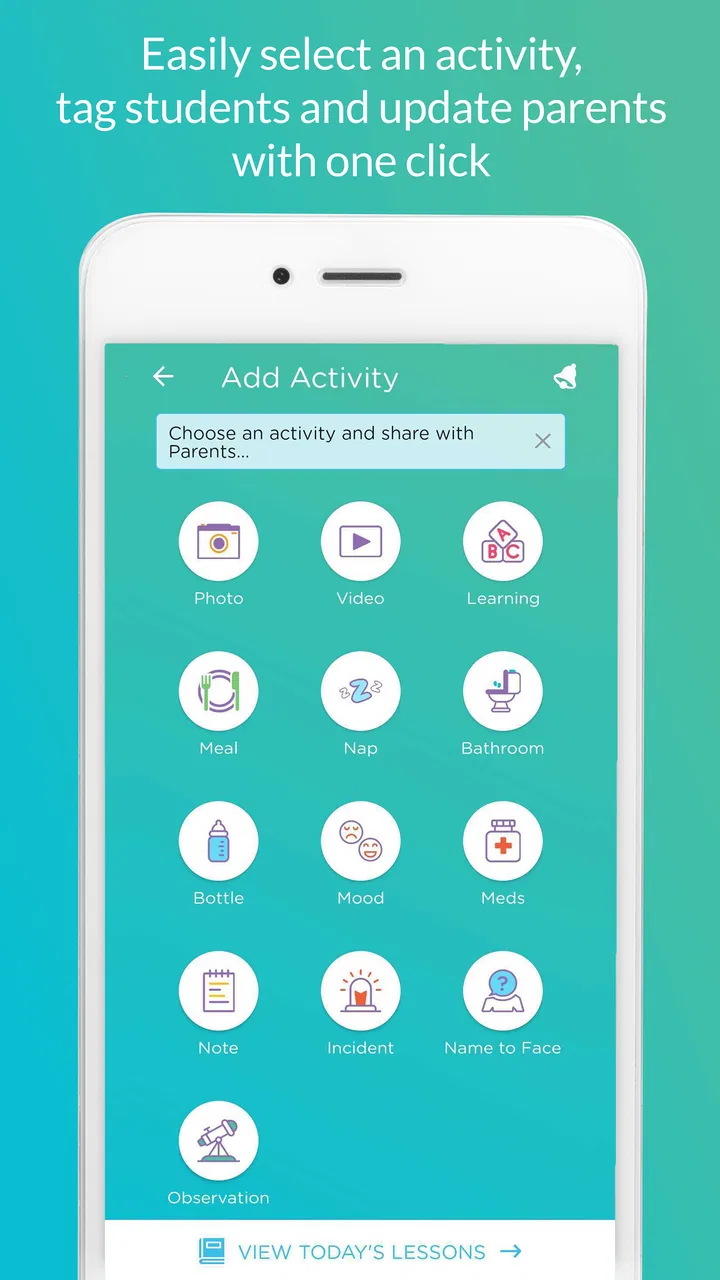
Procare: Childcare App provides a comprehensive suite of features such as attendance tracking, daily reports, billing, and parent communication tools. It also includes photo sharing, lesson planning, and a secure check-in/out process for children. This makes it a holistic solution for managing childcare operations efficiently.
02Is Procare: Childcare App secure for my child's data?
Yes, Procare prioritizes security and uses advanced encryption methods to protect all data. It ensures that sensitive information like attendance records and personal details are stored safely, meeting compliance with industry standards to safeguard children’s data and provide peace of mind for parents and caregivers.
03How user-friendly is the Procare: Childcare App for parents and caregivers?
The Procare app is designed with an intuitive interface that is easy to navigate for both parents and caregivers. It offers straightforward access to daily reports, activity logs, and communication features, ensuring that users can seamlessly interact with the app without technical difficulties.
04Can the Procare app be integrated with other systems?
Yes, Procare offers integration capabilities with various systems, allowing for streamlined operations. It can sync with other software used in childcare centers, such as accounting and payroll systems, enhancing overall efficiency and reducing administrative workload.
05Are there any subscription fees for using Procare: Childcare App?
Procare operates on a subscription basis, with various pricing plans to suit different needs. The costs depend on the size of the childcare center and the features required. It’s recommended to check their official website for detailed pricing information and choose a plan that fits your budget.
Pros
- User-friendly interface for easy navigation.
- Real-time updates on child activities.
- Secure communication with childcare providers.
- Customizable alerts and notifications.
- Comprehensive daily reports and logs.
Cons
- Limited offline functionality.
- Subscription fees can be pricey.
- Occasional syncing issues.
- Complex setup for new users.
- Limited features in free version.

Procare: Childcare App
Gallery